Elixpo Packages

Packages, from source to signed release.

Elixpo develops focused desktop utilities, publishes versioned Debian packages, and delivers stable updates through one shared APT source. Each application remains connected to its source, documentation, releases, and support history.

1 cross-platform native tool2 maintained Linux applications5 maintained npm packages

Native tools

Install a verified tool from its owning project.

Native tools keep source, versioning, signatures, SBOMs, and release authority in their product repository. Elixpo Packages provides one trusted discovery and installation record.

N01Crumb self-hosted autonomous agent harness and natural-language terminal

Autonomous agent harness and natural-language terminal · v1.2.0

Crumb

maintained

A self-hosted Rust agent harness and natural-language terminal that keeps execution, permissions, tools, sessions, memory, and supervision under the user's control.

  • Native Rust agent loop
  • Normal Bash, Zsh, and PowerShell commands
  • Permission-bound tools and sessions
Linux and macOScurl --proto '=https' --tlsv1.2 -LsSf https://raw.githubusercontent.com/elixpo/crumb.elixpo/main/install.sh | sh


Maintained applications

Install a documented Linux release.

The installers verify Elixpo’s repository key, register the shared APT source, and install the selected package. Normal system updates can then deliver later stable releases.

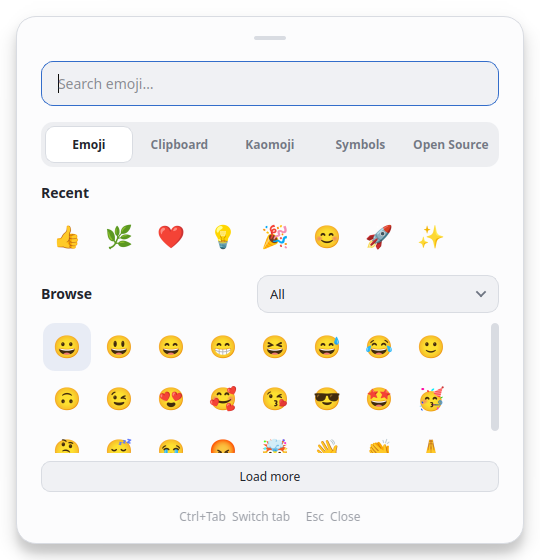
01Win Dot Panel showing the searchable emoji panel

Emoji and clipboard utility · v1.0.0-10

Win Dot Panel

maintained

A desktop panel for finding emoji, kaomoji, and symbols and for keeping a private clipboard history on Linux.

  • Offline emoji, kaomoji, and symbol search
  • Local clipboard and screenshot history
  • Keyboard shortcuts and desktop integration
Installcurl -fsSL -o /var/tmp/win-dot-panel-install.sh https://packages.elixpo.com/win-dot-panel/install.sh && bash /var/tmp/win-dot-panel-install.sh
02

Desktop audio sharing · v1.0.0-2

ScreenBridge

maintained

A focused Linux application for sharing computer audio during calls, presentations, recordings, and streams while keeping microphone control separate.

  • Share computer audio through a virtual input
  • Keep computer sound available locally
  • Use the microphone separately or combine it
Installcurl -fsSL -o /var/tmp/screenbridge-install.sh https://packages.elixpo.com/screenbridge/install.sh && bash /var/tmp/screenbridge-install.sh

Distribution and trust

Both applications use the same signed APT repository.

The repository is built from the latest stable, product-prefixed GitHub releases. The deployment workflow verifies package names and checksums, creates one package index, signs it, and deploys the catalog and repository together.

Read the repository documentation

Signed packages

Installers verify the official key before configuring the repository.

Versioned releases

Each application uses its own release namespace and versioned Debian artifact.

System updates

Stable updates arrive through the standard APT workflow after installation.

JavaScript and command-line tooling

Developer packages published separately through npm.

Subscribe to package releases

These libraries and command-line tools support Elixpo’s canvas, publishing, identity, and link services. They are separate from the Linux application repository above.

Package metadata last verified 2026-10-19.

sudo apt install bamboo